
Home › Paid duty work
The work you pick up on your own time
Details, extra duty, security work, events — whatever your agency calls it and whoever arranges it. This is the part of the week nobody keeps a proper record of, and the part where money quietly goes missing.
Why a note on your phone is not enough
You worked a detail three weeks ago. You are fairly sure of the rate. You think it was five hours, though it ran long. You cannot remember whether that one has been paid, or whether it was the other job for the same employer.
Multiply that by a year and two or three coordinators, and the honest answer to “what did off-duty work bring in last year” is a shrug. Worse, if an employer underpays you, there is nothing to point at.
What goes in when you log a job
One screen, filled in once, and every total on every other screen comes from it.
Employer
Who hired you. Saved once, then picked from a list every time after.
Date, start and end
The hours you actually worked, not the hours that were booked.
Address
Where the job is, with a map button for the drive over.
Rate or flat pay
An hourly rate, or a flat figure for the whole job.
Travel
Paid travel time or a flat travel amount, kept separate from the job itself.
Kilometres
Used your own car to get there? Log the kilometres with the job, and at tax time the year's total is already sitting there.
Kilometres reimbursement
Took a patrol car and your agency charges for it? Enter the kilometres and the rate and the app works out what you owe.
Off-duty scheduler
The coordinator who called you, with their phone and email.
Point of contact
Who to ask for when you get there.
Fields you never use can be switched off in the category, so the form only asks for what you actually record. If your details are always flat pay and you never claim kilometres, the form says so.

BlueShifts. Plan Your Year. Own Your Time.
The shift calendar built for your rotation, off-duty work, and life on and off the clock.
Every assignment under the organiser who arranged it, with the hours, the pay and whether the money has arrived.
Driving your own car, and driving a patrol car
Two different things, pointing in opposite directions, and the app keeps them apart.
Kilometres — the driving you do in your own vehicle to get to a job and home again. Those kilometres can matter at tax time, and the only way to have them at the end of the year is to record them as you go. What to keep and why covers that side.
Kilometres reimbursement — the other direction. Some agencies let you take a patrol car to a detail and charge you for the kilometres you put on it. Enter the kilometres and the rate, and the app shows what that comes to, so the figure on your pay deduction is not a surprise.
Neither applies to every officer. Plenty of agencies charge nothing for a patrol car, and plenty of officers never claim a kilometre of their own. Your agency's arrangement decides which of these you need — and the ones you do not can be switched off so the form stops asking.
Where the job is
Start typing the address and it completes as you go. Where a job has no street address — a stadium gate, a stretch of road, a construction site — drop a pin on the map instead.
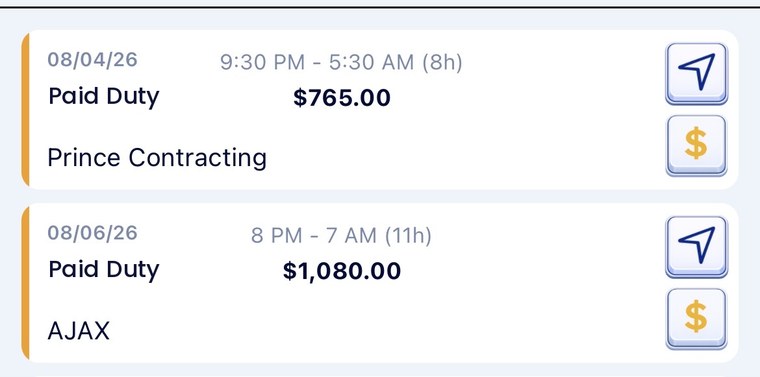
Either way it stays with the job. On the night, open your calendar, tap the arrow on that job and you are navigating. No hunting back through text messages for the address a coordinator sent you three weeks ago.
Watch it earn while you work it
This is the part officers notice first. Once a job is running, the earning ring counts up on screen: what the job has made you so far, the travel on top, and the time still to go. It is the same arithmetic you would do in your head at the end of the shift, done as the shift happens.
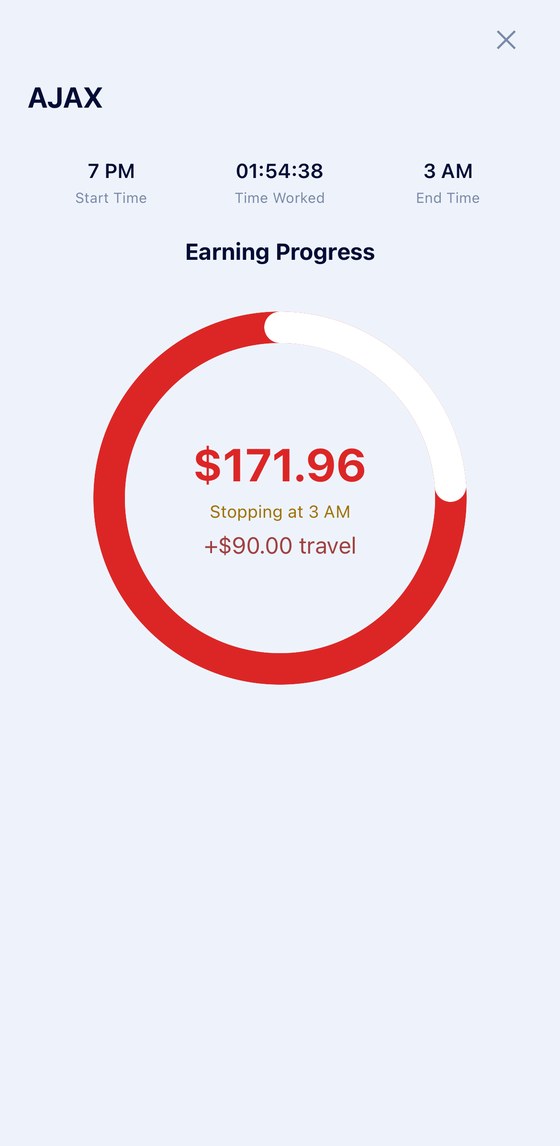
It is a small thing that changes how the work feels. Standing at a construction site at two in the morning, the number on the screen is the reason you are there.
Four states, not two
Every job carries a payment status, and the app uses four of them rather than a simple paid-or-not. The difference between them is the whole point: a job that fell through and a job that has not been paid both put nothing in your pocket, but only one of them is somebody owing you money.
That is the dollar button on the job card — tap it and pick the status. Mark a job paid when the money lands. Until then it sits in payment pending, where you can see it and count it. That one habit is what turns a pile of jobs into an answer to “who still owes me?”
At any point you can look at the year — which coordinator you get the most work through, which employer pays best, what is outstanding — or export the whole record as a PDF for a date range you choose.
Passing work on
The employers and schedulers you save can be sent to another officer by text, so the coordinator who calls you can call them too. It is how paid duty work actually spreads through a department — one officer telling another who to ring.
Your agency's rules come first
Agencies differ on what outside work is permitted, how it must be approved, whether a patrol car can be used and whether kilometres must be reimbursed. Nothing here is advice about any of that — the app keeps the record, your agency sets the rules.
Stop guessing what the year brought in
Log the job when you finish it. The totals, the analysis and the report build themselves from there.
Scan to install

