Designed by a working police officer
The shift calendar that tracks the money too.
You don't work the same days every week. You work a rotating schedule that repeats — a shift rotation, not a work week. Set yours up once and BlueShifts fills in the rest of your calendar — as far ahead as you want, and backward over the months you already worked. Add your off-duty jobs, keep track of your pay and miles, and keep court, jail and hospital info in your pocket.
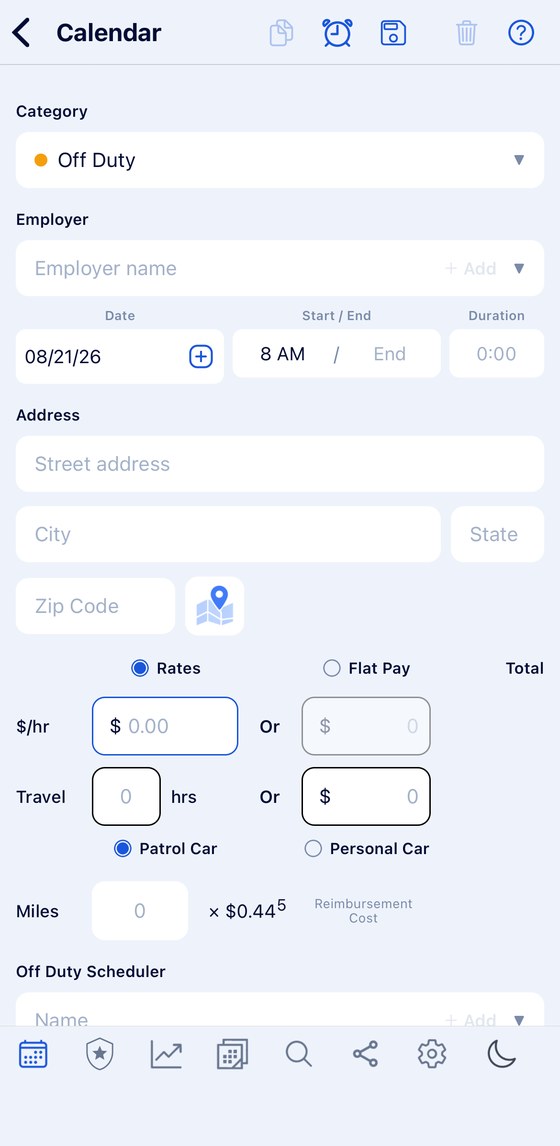
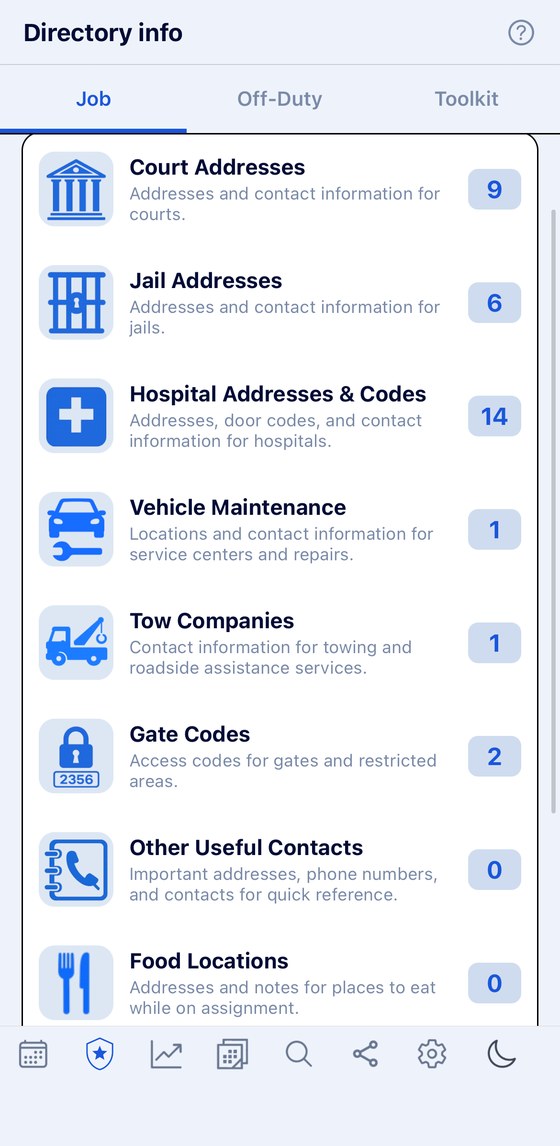
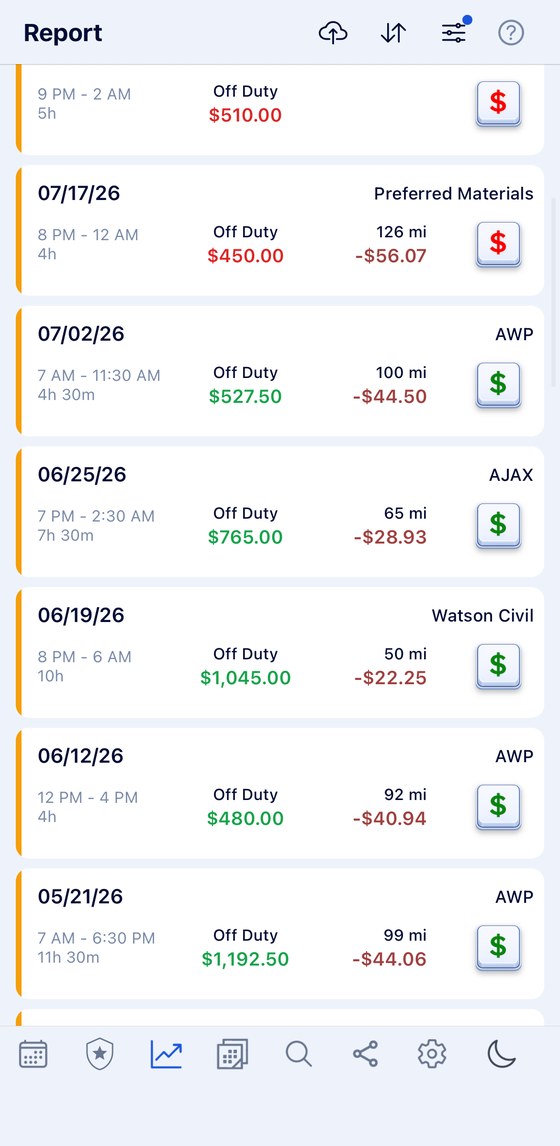
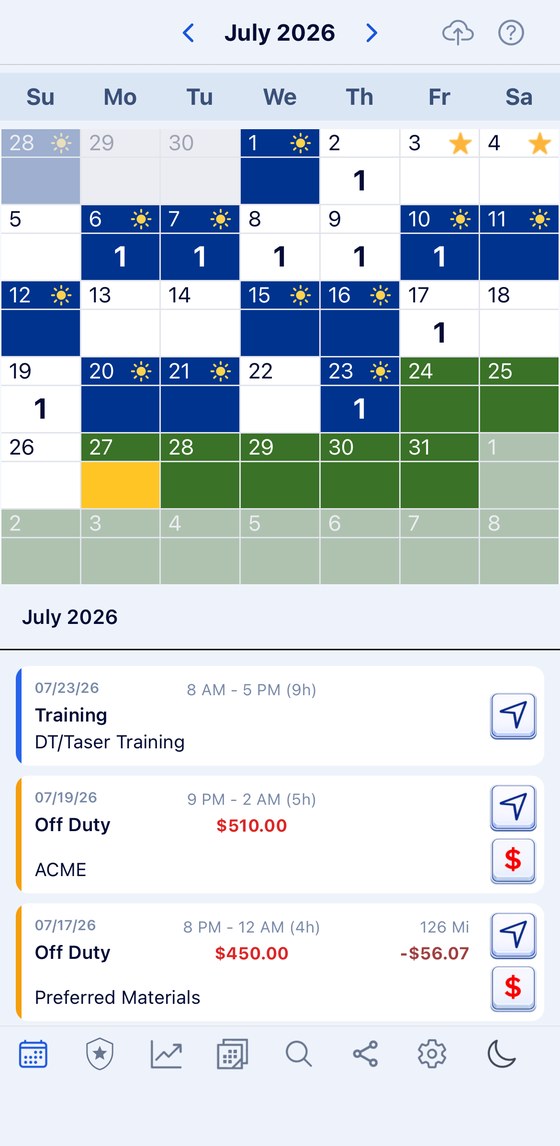
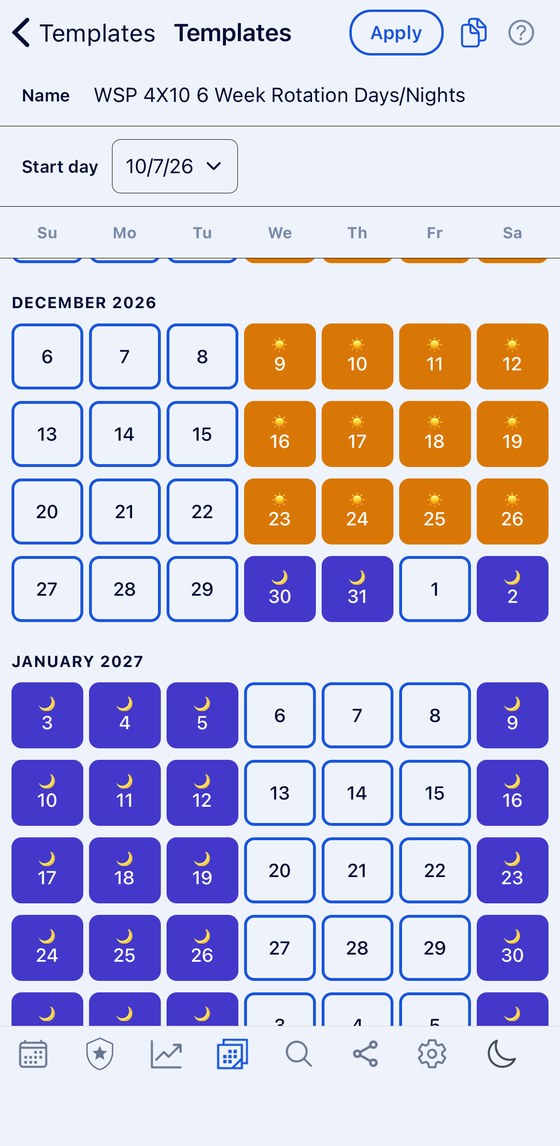
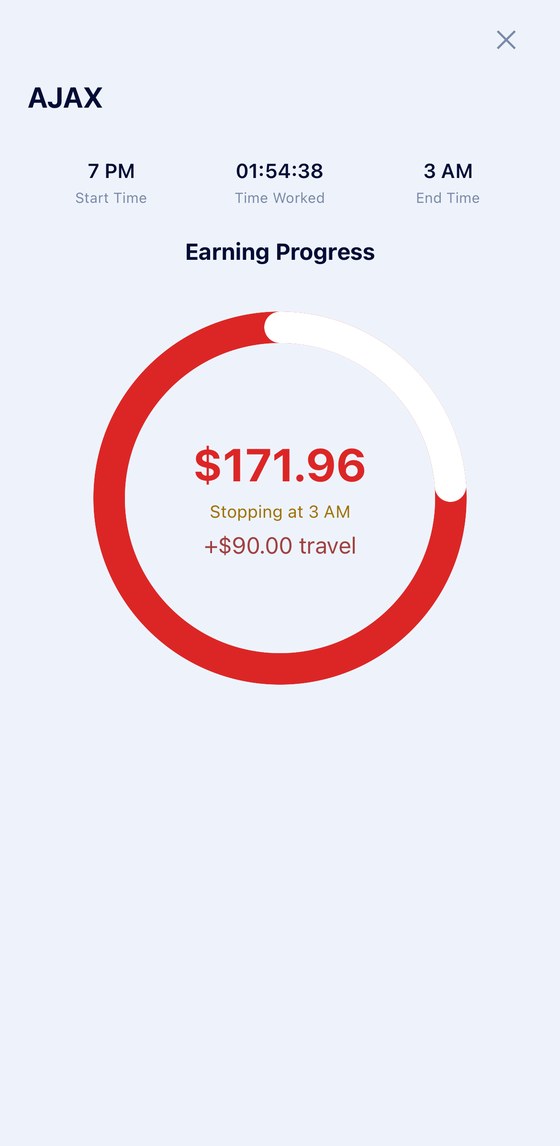
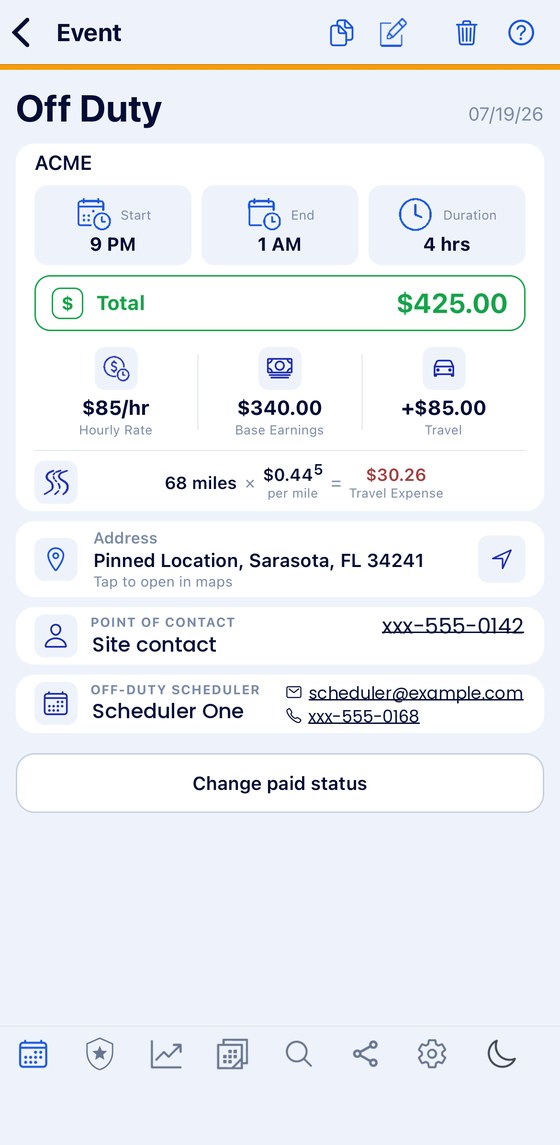
Swipe to see them all. Real screens from the app. Tap any one to see it full size.
Reading the calendar
Each day is split in two: the date on top, the day's events underneath. Blue days come from your rotation, so you never type them in. The colors here are the default skin — there are four to choose from, and a dark mode.
- BlueRegular work scheduled shift
- WhiteDay off
- YellowThe current day
- GreenLeave day
- A numberHow many events that day
- A sunDay shift
- A moonNight shift
- A clockA 24-hour shift
- A starA federal holiday, already in the app
- A star with a dotA holiday you added yourself
- A white outlineThe day you have tapped
- FadedDays either side of the month


Any rotation. However complicated yours is.
Days, nights and twenty-four hour tours, in any order, over a cycle of any length. You build it once, tell it the day your cycle starts, and it fills in every month ahead and every month behind. More on the police scheduling app itself.
DayNight24 hrsOff
Thirty-six days: two days, two nights, then two twenty-four hour tours — three times over, never landing on the same weekday twice.
Twenty-four hour tours are a shift type of their own, not a day shift wearing a different hat. A 24/48, a 48/96, a Kelly with its own day off inside the cycle — the app holds them the way the roster does, which is why it suits firefighters, medics and anyone else living on twenty-four hour tours as well as it suits a patrol rotation.
Nothing here is typed in day by day. Change the start date and the whole rotation moves with it. Add a court date, a training day or an off-duty job on top, and the rotation underneath stays exactly where it was.
What’s inside
BlueShifts does a few things well instead of twenty things poorly. These are the ones officers actually use.
Rotating shifts
You don't type your shifts in one at a time. Save your rotation once, tell the app what day it starts, and it fills in the calendar for you — as far ahead as you want to look, and backward over months you already worked.
- Day, night and 24-hour rotations of any length, added in one step
- One-off changes on top of your rotation, entered as events
- Leave colors the day itself; training shows as an event below the calendar
- Federal holidays built in, and your own on top — both marked with a star
- Sunrise and sunset times on the calendar in the hour either side of each
- Your own categories, with only the fields you want
- Share your shifts and events with someone — never your pay
- Analytics on every employer and scheduler
- Your shifts into a Google Calendar — yours or someone else's, both ways
- Your own Google and Apple events shown inside the app
Sharing and calendars
Your shifts can go into a Google Calendar — your own, or your partner's, or a scheduler's. Their events come back to you, so it works both ways, and the other person never installs anything.
Your own Google and Apple calendars can be connected too, so everything you already have shows up alongside your shifts on one screen.
- Your shifts into a Google Calendar, both ways
- The other person does not need the app
- Two BlueShifts users can link by QR code instead
- Your own Google and Apple events shown in the app
- Pay is never shared, whichever way you share
The directory
Court and jail addresses, hospital door codes, gate codes, tow companies and the numbers that are not written down anywhere official — on your phone, signal or no signal.
It is also how you onboard someone. A new member arriving at the detachment can have years of local knowledge in one text message, instead of learning it the slow way.
- Courts, jails and hospitals with their door codes
- Gate codes, tow companies and vehicle maintenance
- Codes stay hidden until you hold to reveal them
- Send one entry or the whole directory by text
- There whether or not you have a signal
The Toolkit
A library of reference documents — Miranda, SFST clue guides, HAZMAT placards, VIN and CVE guides. The Toolkit is in development and is not in the app yet.
- Miranda, SFST, HAZMAT, VIN and CVE documents
- In development — not available yet
Off-duty work
Add each off-duty job and pick who you worked it for. The app keeps the hours, the pay and the miles, and adds up your totals for you.
- Save each employer and scheduler once
- Your rate, your hours and what you earned
- Miles on the jobs where you record them
- Send a scheduler or employer to another officer by text
Career dashboard
A record of the career itself — the milestones behind you, and how long is left until retirement.
- Career milestones
- Time remaining until retirement
- In development — not available yet
Built for police. Works for any shift worker.
The app is built around police work, but nothing in it is locked to police work. You build your own categories, and you decide what each one asks you for.
A category is just a type of day you want to track. The app starts you with Off Duty, Court, Training, General and Health — but you can rename them, recolor them, reorder them, hide the ones you never use, and add your own.
Court and Training are there because they are the two most likely to be missed — a court date lands in the middle of your rotation, and training is set weeks out. Both can carry alerts before the day.
When you make a category, you turn on only the parts you need. Each one is a switch:
- Employer — who you worked it for
- Address — with a pick list for regular, court, jail or hospital
- Rate — and the total pay works itself out
- Mileage — miles and price per mile, with the reimbursement shown
- Scheduler — name, phone and email of whoever booked you
- Contacts and Notes
Turn a switch off and that field disappears from the form. So a category can be as simple as a name and a color, or as detailed as a paid job with an employer, an address, a rate and mileage attached.
That is why the app fits jobs it was never named after. A firefighter tracks shift trades and station duty. A postal worker tracks routes and the extra shifts they pick up. A nurse tracks units. A parent tracks the weeks the kids are with them and the weeks they are not — same repeating pattern, same calendar, different category.
Not in policing? Switch the off-duty side and the directories off and it is a plain shift calendar →
Already used by people working:
- Police Officers
- Sheriff's Deputies
- Firefighters
- EMS & Paramedics
- Dispatchers
- Corrections Officers
- Other First Responders
- Nurses & Healthcare Workers
- Security Officers
- TSA Officers
- Postal Workers
- Plant & Refinery Workers
- Transportation Workers
- Shared Custody & Co-Parenting
Make it look the way you want
Four skins and a full dark mode, so the calendar reads the way you want it to at four in the morning.
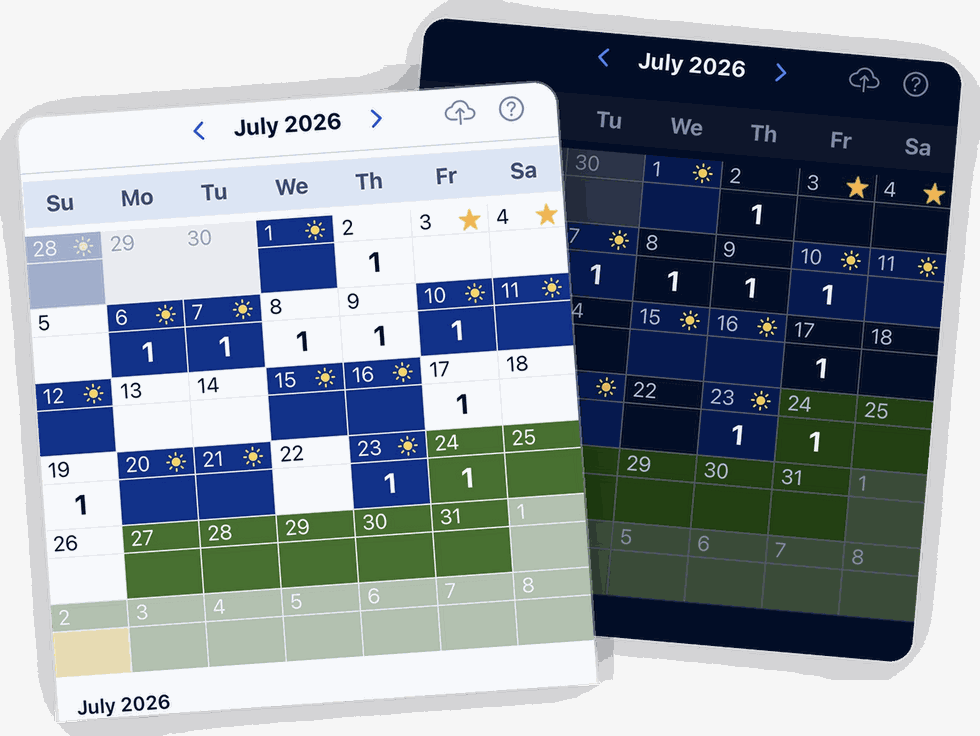
There are also sun and moon icons in the bottom right corner of the app, which switch between the two without opening Settings at all. The skins, 24-hour time and the bottom bar →
Share your calendar — without sharing your pay
Two people running BlueShifts can link up and see each other's schedules — or you can share straight into someone's Google Calendar, so they need no app at all. Your financial information is never part of it, either way.
A spouse who can see your rotation stops asking what you are working next weekend. A partner on the same squad can check whether you are both off before proposing a trade. A parent sharing custody can see which weeks belong to whom without a phone call.
How the link works
One person shows a QR code, the other scans it. That is the whole setup — no accounts, no email addresses, no invitations to accept. The two apps are linked from that moment.
What gets shared, and what never does
- Shared: your shifts and your events — court, training, leave, off-duty jobs
- Never shared: financial information. Pay, rates and earnings stay on your phone whatever else you share.
So a spouse can see that you are working a detail on Saturday and where you will be, without seeing what it pays. That split is deliberate, and it is not something you have to remember to switch off.
Sharing and syncing are not the same thing
SharingThey see your shifts and events, and you see theirs
SyncingBrings your own events in
Sharing is for someone else. Syncing is for you.
Sharing with someone who does not have the app
The other person does not need BlueShifts. If they use Google Calendar, your shifts can go straight into it — and their events come back to you, so it works both ways. A spouse, a scheduler, a partner on another squad: they carry on using the calendar they already have, and your rotation simply appears in it. Pay is never part of what travels.
Your own calendars, on the same screen
Your Google Calendar and your Apple Calendar can be connected to BlueShifts as well. Everything already in them shows up alongside your shifts, kept in step by itself, so you are not checking two apps to find out whether a detail lands on your daughter's recital. Those events are shown, not edited — they stay under the calendar they came from.
Send someone your rotation
You can also share your current rotation template on its own. A new officer joining your squad can have your exact pattern in a few seconds instead of setting it up from scratch — and their calendar fills itself in from there.
Nothing is shared until you do it. By default nothing is stored anywhere else and nothing is transmitted. That applies to the Google Calendar sharing too: it happens when you choose it, with the calendar you choose.
Your schedule stays on your phone.
Your shifts, your employers and your pay stay on your phone. We don't keep a copy on a server, so there is nothing for anyone to sell, leak or hand over. Read the full policy.
We store nothing
Your schedules, employers, addresses, codes, pay and miles are never kept by us.
It stays on your phone
Everything you enter stays on your device. Keep your own backup, because we have no copy to give you.
Sharing is phone to phone
When you share a rotation template, it goes straight to the other phone. We don't keep a copy.

Who is behind it
BlueShifts comes from a working police officer with twenty years on the job — someone who works the same rotation you do and picks up the same off-duty jobs. He did not write the code. A friend who builds software did that, working from what the officer told him the job actually needs.
That is why the app has what a working officer actually needs — for the regular job and for the off-duty work — instead of what a software company would have guessed at. And it is why nothing you enter leaves your phone unless you choose to share it.
What else is here
The app is one part of it. The rest of the site is a reference library for the job — every figure taken from an employer's own published document, with a link to it.
Police pay
Every state
What a new officer earns to start, department by department, from the employer's own pay plan or class specification.
2,290agenciesOff-duty work
Rules by agency
Hour caps, approval, who pays and what happens to the money — taken from each department's own published policy.
216agenciesShift patterns
How the roster works
Pitman, 4-3, Panama, DuPont and the rest — how each cycle runs, what it does to your weekends, and who uses it.
29patternsCareers
Choosing a badge
Roles compared side by side and drawn from the agencies' own job descriptions, plus a hundred-question fit questionnaire.
21fieldsWho it's for
By role
What the calendar looks like for a patrol officer, a detective, a deputy, campus and corrections — and what each one tracks.
11rolesCanada
Separate section
Canadian shift patterns and policing, kept apart from the American material because the terms and the law are not the same.
18pagesPut the month in your pocket
Available now on iPhone and Android.
Scan to install


