
Home › 1099 off-duty jobs
1099s and off-duty jobs
When an off-duty employer pays you directly, that is 1099 work. You are not on their payroll, no taxes come out, and nobody is keeping a record for you. This page covers that kind of work only: what the paperwork does and does not tell you, and what to write down while the job is still fresh.
Extra duty, detail work, side jobs — same thing
What officers call this work depends on where they are. Extra duty, detail work, detail pay, secondary employment, side jobs, off-duty details. It is all the same arrangement: work you pick up outside your regular shift, paid by whoever hired you rather than by your agency.
That last part is what makes it 1099 work instead of something that appears on your regular check — and it is why the record is yours to keep.
Paid by the department, or paid by the customer?
This is the distinction everything else turns on, and a great many officers have it the wrong way round.
If the job is arranged through your agency and the money comes to you the way your salary does — through payroll, with tax already taken out — then it is wages. It lands on your W-2 along with everything else you earned that year, whatever anyone calls it around the station.
If the business that hired you pays you directly, you are being paid as an outside contractor. That is the arrangement that produces a 1099, and only if you passed the threshold with that one employer.
Plenty of officers have both in the same year, from the same kind of work. One department runs details through payroll; the next town over sends officers to invoice the customer themselves.
| Paid through the agency | Paid direct by the customer | |
|---|---|---|
| How it reaches you | Payroll, like your salary | The business pays you |
| Tax withheld | Yes, as usual | No — nothing is taken out |
| What arrives in January | It is on your W-2 | Possibly a 1099, possibly nothing |
| Who tracks the hours | The agency, and you | Only you |
Why it matters: the two are treated completely differently, and the rules for what an employee can claim are not the rules for a contractor. Which side of the line a job falls on is a fact about how you were paid — not something to guess at, and worth establishing before you assume anything follows from it.
A form is not a record of what you earned
An employer only has to send you a form once they have paid you more than a set amount for the year. The IRS sets that amount. Two things about it catch officers out.
First, it counts each employer separately, not your off-duty work as a whole. If you work for several employers, you can stay under the amount with every one of them. You get nothing in the mail, even though you earned a lot.
Second, that amount has changed before and can change again, so there is no point memorising it. What never changes is this: a form is a poor guide to what you earned, and no form does not mean no tax.
You owe tax on the money either way. The rule decides what the employer has to send you. It does not decide what you have to report.
Paid and earned are two different years
A 1099 reports what was paid to you during the calendar year. It does not report what you worked during it.
Off-duty jobs are often paid weeks later. A job you worked at the end of December and got paid for in January usually shows up on next year's form. It happens the other way too: last year's work, paid late, lands on this year's form.
This is the most common reason a form does not match your own notes. It is also why you want a record that shows both the day you worked and whether the money has actually come in.
Which jobs are still owed to you
The other half of the problem is money that never showed up. Off-duty work runs on invoices and schedulers, and some companies pay faster than others. A job you worked months ago and never got paid for is easy to forget, and hard to chase without a date, an employer and an amount.
Marking each job paid or unpaid answers two questions at once: what should show up on a form, and who you need to call.

BlueShifts. Plan Your Year. Own Your Time.
The shift calendar built for your rotation, off-duty work, and life on and off the clock.
Your own record of the year, built as you work rather than reconstructed in April.
Mileage runs in two directions
Mileage on off-duty work is not one thing, and this is where general advice usually gets it wrong.
- Some officers drive their own vehicle to off-duty jobs, and those miles may matter at tax time.
- Some agencies charge you per mile for taking a patrol car to an off-duty job. That money goes back to the department, out of what the job paid.
- Many agencies do neither, and mileage simply is not part of the arrangement.
Which one applies to you comes down to your department policy or your contract. This page cannot tell you which, and anyone who says it works the same everywhere is guessing. Either way, write the miles down when you work the job. Trying to remember them months later never goes well.
What we can show you is what agencies actually publish. Every agency policy we have read, side by side on vehicles — whether the department's car may go to the job at all, who pays for it, and what it costs. Florida Highway Patrol charges troopers 44.5 cents a mile; Saint Paul deducts a flat $20 a job from payroll; most New Jersey towns bill the employer by the hour. And where an agency says nothing about your own car, that page says so rather than guessing.
What the IRS standard mileage rate has been
The rate is set each year, and twice in the last decade it changed mid-year when fuel prices moved. It is not a promise that any of these apply to you — whether you can use them at all depends on how you were paid and on the rules in force for that year. It is here so the numbers are in front of you when you talk to someone qualified.
Cents per mile, business use. The bar marked now is the rate in force.
Source: IRS standard mileage rates. The current figure is published at irs.gov.
Checked 3 August 2026. Every rate above was verified against the IRS on that date. New rates are normally published each December and take effect in January, and the IRS has twice changed one mid-year. Check irs.gov for the figure in force today.
This is a table of published figures, not advice about your return. Whether any of it applies to your situation depends on how you were paid, what your agency reimbursed, and the rules for that tax year. That is a conversation for a tax professional — and the reason to keep the record is so that you can have it.
What a complete record looks like
For each off-duty job, the details that turn out to matter later:
- The date worked, and the hours actually worked rather than the hours booked
- The employer — the specific one, since the threshold is counted per employer
- The rate and the gross amount
- Whether it has been paid, is still pending, or fell through
- Mileage, where your agency's arrangement makes it relevant
None of this is hard. It is just boring enough that almost nobody keeps it on paper, and you need it exactly when the year is over and you have forgotten the details.
How BlueShifts keeps it
Every off-duty job is saved under the employer who hired you, with the hours, the rate, the pay and the miles on the job itself. The Report screen adds up the year and splits it into what you have been paid and what you are still owed.
Each job carries a payment status, which is what makes the paid-versus-pending split possible:
Mileage is recorded per job and totalled for the year, so if your agency does charge for vehicle use, the figure is already there rather than reconstructed in February.
The report you can hand to someone else
Notes on your phone help you. At tax time you need something you can hand to someone else without explaining it.
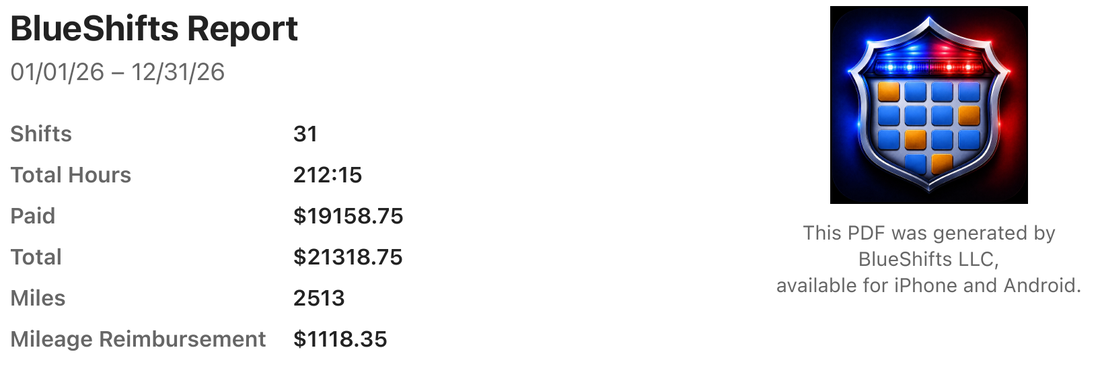
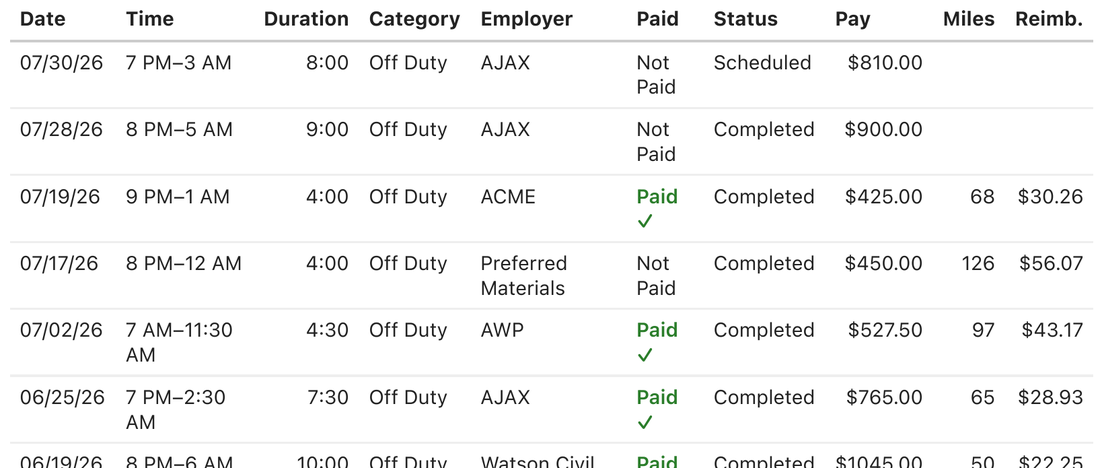
BlueShifts exports the whole thing as a PDF for any date range you choose — a tax year, a quarter, or the stretch a single employer is asking about. The top of the report summarises the period: shifts worked, total hours, what has been paid, the overall total, miles driven and mileage reimbursement. Underneath, every job is listed as a row:
Below that, every job is listed as a row — date, time, duration, category, employer, whether it has been paid, its status, the pay, the miles and the reimbursement:
That one page does several jobs:
- Give it to whoever does your taxes. Instead of a folder of invoices, they get every job, every employer, and totals that already separate paid from unpaid.
- Check the forms that arrive. Every row names the employer, so you can add up what one employer really paid you and compare it to what they reported. If a form is wrong, this is what you fix it with.
- See who still owes you. The unpaid rows are your call list, with the date, the employer, the hours and the amount already there.
- Keep the jobs that fell through. Canceled work stays in the list instead of vanishing, which matters when a cancellation was supposed to be paid and wasn't.
- Back up a mileage claim if your agency asks for one, with the miles and the amount already added up.
- Answer "what do you earn on the side?" when a lender or landlord asks. It is your own record, not proof from an employer, but it is dated and it covers the whole period.
Your phone makes the PDF from what you already entered. Nothing is uploaded to create it, and nothing leaves your phone unless you send the file yourself.
When the forms do arrive, your own per-employer totals are what you check them against — and where a form is wrong, they are what you correct it with. Everything stays on your phone unless you choose to share it.
Common questions
Will I get a 1099 for every off-duty job I work?
No. A form is only required once one employer has paid you more than a set amount for the year. That amount counts each employer on its own, not all your off-duty work together. If you work for several employers, you can stay under it with every one of them.
If no form arrives, is the income still taxable?
Yes. That rule only decides whether the employer has to send you a form. It does not change whether you owe tax on the money.
Why doesn't the form match what I worked?
A 1099 shows what you were paid during the year, not what you worked during it. A job you worked at the end of December and got paid for in January usually lands on next year's form.
Do I have to pay my agency back for mileage?
That depends on your agency. Some departments charge you per mile for using a patrol car on off-duty work, and many do not. Your department policy or contract decides it.
This page is general information about keeping records for off-duty work. It is not tax or legal advice. The rules change and they differ by state. For your own situation, talk to a tax professional, and check your department policy or contract for anything about patrol cars and mileage.
Your record, not theirs
Hours, employers, pay and miles, saved on your phone as you work, so the year adds itself up.
Scan to install

