
Home › Compare apps › My Shift Planner
Looking for a My Shift Planner alternative?
My Shift Planner is one of the largest general shift calendars, with pay rates and timesheets. Here is how the two line up.
What My Shift Planner is
My Shift Planner is one of the largest general shift calendars, with over 400,000 shift workers according to its listing. It covers nurses, drivers, retail staff, engineers, airline crew and paramedics.
Its listing describes preset patterns including 4 on 4 off, DuPont and Continental, custom pay rates with estimated earnings, leave tracking, timesheets you can submit and download, calendar sync and schedule sharing.
What My Shift Planner does well
- Timesheets. You can submit and download them, with comments for a manager, which BlueShifts does not do.
- Annual leave tracking with balances.
- Syncing shifts into your phone calendar today.
- Face ID or Touch ID lock on the app.
Where BlueShifts is different
Both track pay. The difference is what the pay is attached to.
- My Shift Planner estimates earnings from your rate. BlueShifts records each off-duty job under the employer who hired you, with the actual pay, the miles, and whether the money has arrived.
- A PDF of your off-duty work rather than a timesheet of your rota.
- Court, jail and hospital addresses, gate codes and tow companies for the road.
- No ads. My Shift Planner shows ads unless you upgrade.

BlueShifts. Plan Your Year. Own Your Time.
The shift calendar built for your rotation, off-duty work, and life on and off the clock.
Everything below is on your phone in a couple of minutes: the rotation, the off-duty work, and what it earned you.
Side by side
| BlueShifts | vs | My Shift Planner |
|---|---|---|
| The rotation and calendar | ||
| Yes | Repeating rotation patterns | Yes4 on 4 off, DuPont, Continental presets |
| Yes | Build your own custom rotation | Yes |
| Yes | Fills the calendar backward over months already worked | Not stated |
| Yes | Custom holidays you add yourself | Not stated |
| YesGoogle and Apple events shown in the app; shifts out through Google | Sync with your phone calendar | Yes |
| Yes | Share your schedule with someone | Yes |
| Not stated | Face ID or Touch ID lock | Yes |
| Hours and money | ||
| Yes | Pay rates and estimated earnings | Yes |
| Not statedLeave sits on the calendar | Leave and annual leave tracking | Yes |
| Not stated | Timesheets you can submit and download | Yes |
| Yes | Off-duty jobs logged against the employer | Not stated |
| Yes | Paid and unpaid tracked separately | Not stated |
| Yes | Mileage recorded per job | Not stated |
| Yes | Year totals for shifts, hours, miles and pay | Not stated |
| Yes | PDF report of your off-duty work | Not stated |
| On the road | ||
| Yes | Court, jail and hospital addresses | Not stated |
| Yes | Gate codes, tow companies, vehicle maintenance | Not stated |
| In development | Reference documents (Miranda, SFST, HAZMAT, VIN, CVE) | Not stated |
| Yes | Address autocomplete, or drop a pin | Not stated |
| Yes | Navigate to the job from your calendar | Not stated |
| Yes | Send a directory entry or a scheduler by text | Not stated |
| YesA Court category; the subpoena details go in the notes | Court dates and subpoena details | Not stated |
| YesA Training category, with alerts before the day | Training dates, set well ahead | Not stated |
| Off-duty work and money | ||
| Yes | Hourly rate or flat pay per job | Not stated |
| Yes | Travel time or travel pay, kept separate | Not stated |
| Yes | Mileage reimbursement when a patrol car is used | Not stated |
| YesCancelled, pending, awaiting payment, paid | Four payment states, not just paid or unpaid | Not stated |
| Yes | Live earnings while you work the job | Not stated |
| What the year tells you | ||
| Yes | Which scheduler you get the most work through | Not stated |
| Yes | One employer against the average of the rest | Not stated |
| Yes | Your employers ranked by what they brought in | Not stated |
| Yes | The days you normally work for each employer | Not stated |
| The app itself | ||
| Yes | Works with no internet connection | Not stated |
| Yes | Backup and restore | Not stated |
| YesThirteen intervals from 5 minutes to a week, or your own | Reminders and alerts | Not stated |
| Yes | Import and export your schedule | Not stated |
| Yes | Ready-made rotation templates | Yes |
| YesFour skins, dark mode in one tap | Skins and a full dark mode | Not stated |
| Yes | No account needed | Not stated |
| Sharing with someone else | ||
| Yes | Link two phones by scanning a QR code | Not stated |
| Yes | Shifts and events shared, pay never shared | Not stated |
| YesThrough Google Calendar, both ways | Share with someone who does not have the app | Not stated |
| Yes | Send someone your rotation template | Not stated |
| About the app | ||
| None | Advertising | Ads, removed with Pro |
| Police officers | Built for | Nurses, drivers, retail, engineers, airline crew, paramedics |
Sharing and syncing are not the same thing
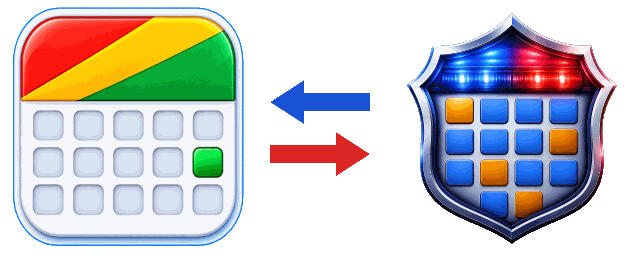
SharingThey see your shifts and events, and you see theirs

SyncingBrings your own events in
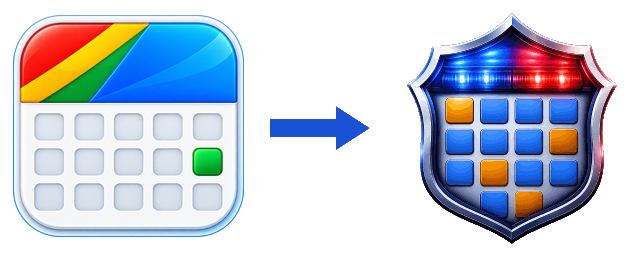
Sharing is for someone else. Syncing is for you.
From each app's own App Store listing, checked 1 August 2026 — the My Shift Planner listing.
How this comparison was put together
Everything in the table comes from each app's own App Store listing, checked on 1 August 2026. Where a listing does not mention a feature, the table says not stated rather than no — an app may do something its listing never mentions. Nothing here is a test of the apps themselves. Anything marked in development is a BlueShifts feature being built now, not one you can use today.
Listings change. If something below is out of date or wrong, tell us and it gets fixed.
Coming from My Shift Planner?
My Shift Planner handles the rotation and gives you an earnings estimate. The difference here is that nothing is estimated: each job is a real employer, a real rate, and a real paid or unpaid.
Scan to install

